
Why Your Go HighLevel Emails End Up in Junk (and How to Improve Deliverability)
Why Your Go HighLevel Emails End Up in Junk (and How to Improve Deliverability)
Email deliverability, LeadConnector, and what’s actually changed
If you spend any time in GoHighLevel communities, you’ll see the same question appear again and again:
“Why are my GHL emails going to junk?”
Closely followed by:
“Is Go HighLevel just bad for email?”
It’s understandable. When open rates dip or emails land in spam, the easiest thing to blame is the platform.
But in most cases, the platform isn’t the issue.
The reality is more nuanced, and once you understand it, the situation feels far less dramatic and far more manageable.
First things first: GoHighLevel doesn’t control inboxes
When you send emails through Go HighLevel, you’re usually sending via LeadConnector, which is the built-in email service.
GoHighLevel and LeadConnector handle:
The sending infrastructure
The connection to your domain
The technical pathway for delivery
What they do not control is:
Whether Gmail puts your email in Primary, Promotions or Spam
Whether Outlook flags it as suspicious
Whether Yahoo decides it looks like marketing
Inbox providers decide that.
And over the past year or two, they’ve tightened the rules significantly.
What’s actually changed (and why it feels worse)
Gmail, Outlook and Yahoo have all increased filtering sensitivity, especially around marketing-style emails.
That means:
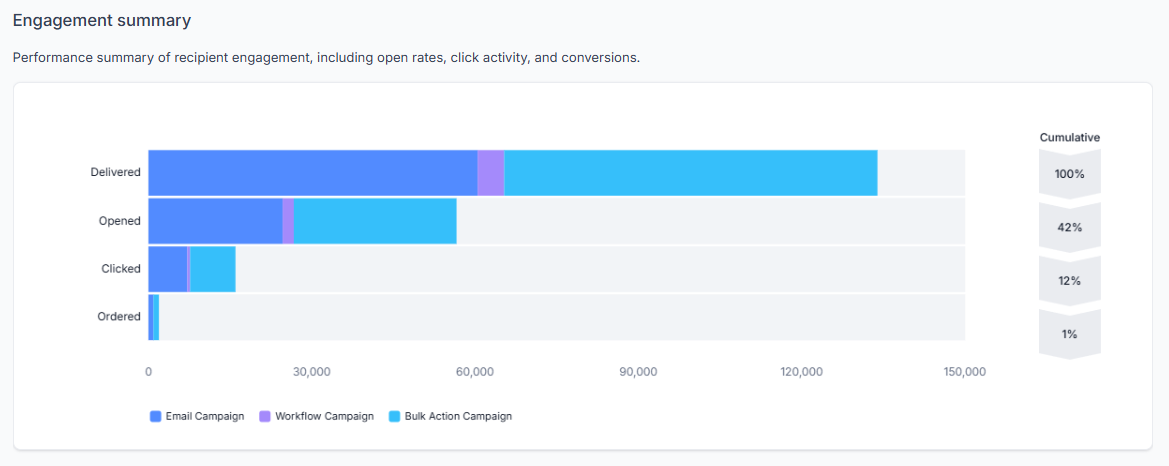
Engagement matters more than ever
Cold or poorly maintained lists are punished faster
Domains with weak authentication are flagged quickly
Sudden spikes in sending volume raise alarms
This affects everyone, not just Go HighLevel users.
Some platforms shield users from bad practice by restricting how much you can send or how you send it. GoHighLevel doesn’t do that. It assumes you understand what you’re doing.
That freedom is powerful, but it also means poor setup shows up quickly.
The people who are managing their email properly aren’t seeing dramatic collapses in deliverability. They’re not immune, but they’re not panicking either.
That matters.
How email reputation actually works (in plain English)
Every sending domain builds a reputation.
Inbox providers look at:
Whether your domain is authenticated correctly
How often people open your emails
Whether people reply
Whether people delete without reading
Whether people mark your email as spam
It’s less about the platform and more about behaviour.
If engagement is healthy and your technical setup is correct, you’re in a strong position.
If either of those things are weak, deliverability suffers.
The setup issues that cause most problems in LeadConnector
The majority of deliverability issues come down to a handful of repeat mistakes.
1. Sending from the wrong type of address
Using a Gmail or Outlook address as your “from” email without proper domain alignment is one of the quickest ways to damage deliverability.
Inbox providers expect marketing emails to come from a properly authenticated domain, not a free mailbox.
If you’re sending campaigns from something like:
you’re already starting at a disadvantage.
2. Domain authentication isn’t properly configured
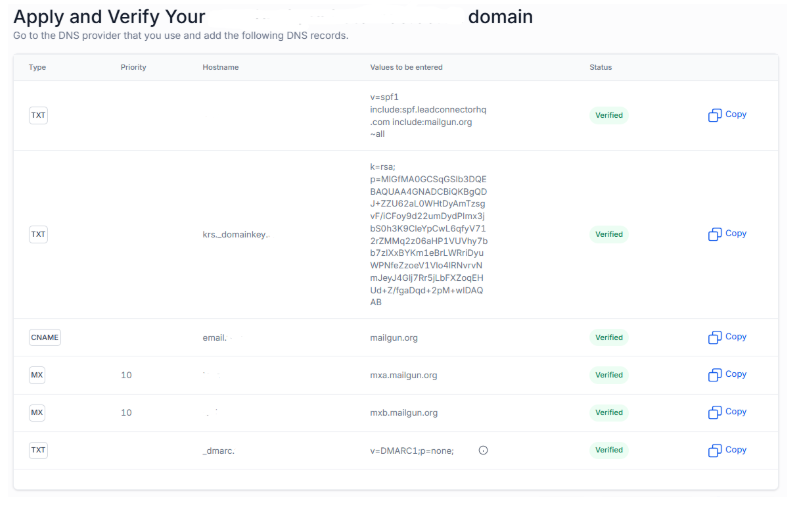
SPF, DKIM and DMARC might sound like a foreign language, but connecting your domain email correctly is key.
If your domain isn’t correctly authenticated, inbox providers can’t verify that you’re genuinely authorised to send on its behalf.
In LeadConnector, this shows up clearly in your Settings - Email Services.
If your email sending domain isn’t verified, no amount of copywriting will fix deliverability.
3. Uploading old or cold lists and sending immediately
This is a big one.
If you upload a list that hasn’t been engaged in months and send a campaign straight away, inbox providers notice.
Low opens, no replies, possible spam reports. That damages domain reputation quickly.
Deliverability is cumulative. It improves with consistent, engaged sending. It declines with cold, disengaged sends.
4. Mixing system emails and marketing emails from the same address
Using one address for:
Automation notifications
Booking confirmations
Broadcast campaigns
Promotional launches
can blur your sending patterns.
Separating transactional communication from promotional campaigns is often healthier long term and can prevent issues with transactional email not getting through when someone unsubscribes from marketing.
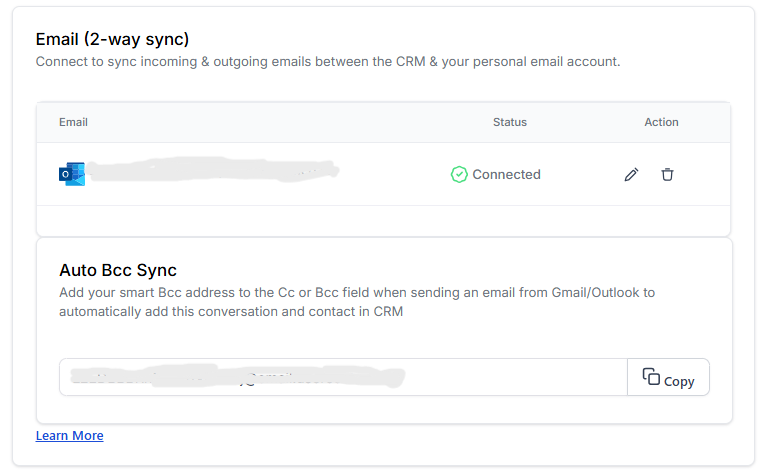
Use the 2-way sync in your personal profile to send 1:1 email communications from your usual business email, rather than the email sending domain you use for marketing and bulk email.
5. Expecting today’s inbox behaviour to match two years ago
This one isn’t a technical mistake. It’s an expectation issue.
Email deliverability is simply stricter now.
Promotions tabs are more aggressive. Spam filtering is faster. Inbox providers are prioritising user experience over marketer convenience.
Even well-managed accounts may see more filtering than they used to.
That doesn’t mean something is broken.
It means the rules changed.
What “good enough” looks like
Perfection isn’t realistic. Inbox placement is never guaranteed.
What you’re aiming for is:
A properly authenticated sending domain
Sensible, steady sending behaviour
Clean, engaged lists
Realistic expectations about open rates
When those foundations are in place, LeadConnector performs reliably.
If your emails are landing in junk, start here
Before changing platforms or panicking, check:
Is my email sending domain fully authenticated?
Am I sending from this same domain address?
Have I cleaned disengaged contacts from my list?
Have I increased volume gradually rather than suddenly?
Am I expecting inbox placement in Primary for marketing-style emails?
In many cases, correcting one or two of these stabilises things.
A realistic perspective
It’s tempting to blame the tool when something changes.
But email deliverability is an ecosystem issue, not a platform issue.
Go HighLevel isn’t inherently bad for email. It simply gives you more control and assumes you understand the fundamentals.
When those fundamentals are in place, results are steady.
When they aren’t, the cracks show quickly.
Understanding that difference is far more powerful than switching platforms.
If you want a second pair of eyes
This article is meant to help you understand what’s in your control and what isn’t.
If you’re unsure whether your setup is helping or hurting your deliverability, sometimes a quick review is easier than guessing.
But in many cases, simply tightening the foundations is enough.
The goal isn’t perfect inbox placement.
It’s stable, sensible email behaviour that supports your business rather than damages it.
In summary
Inbox providers changed the rules, not just Go HighLevel
LeadConnector isn’t the problem in most cases
Poor setup and unrealistic expectations cause most issues
Deliverability is about reputation and behaviour
Good foundations dramatically reduce risk
If someone tells you Go HighLevel is “rubbish for email”, the better question is:
How was it set up?


